How I Use AI for Code Review
Over the past year, I’ve been writing nearly all my code with AI. Meanwhile, TinyShip has been live for six months now — it keeps gaining features, the codebase keeps growing, and since it’s a template product with real users, quality can’t be an afterthought.
The thing is, AI can spit out hundreds of lines across seven or eight files in a minute. There’s no way I can read every line. What makes it trickier is that TinyShip is a monorepo — three apps (Next.js, Nuxt.js, TanStack Start) that need to change in sync, plus support for both PostgreSQL and SQLite. A change in one place can ripple into the other two.
When a feature commit clocks in at over a thousand lines, my stomach tightens. How do I actually review all that code properly?
I recently came across a great article — Using AI to write better code more slowly. The core idea is that writing code with AI shouldn’t just be about speed. It should be about using AI to produce more robust, higher-quality code. That means slowing down, reading the code carefully. That resonates deeply with me.
So for my own product’s quality, I take a two-pronged approach:
- Testing — especially for TinyShip, E2E tests are essential. With six different configurations in play, there’s no getting around it. I’ll cover my E2E strategy in a follow-up post.
- Code Review — I built my own review workflow. I call it Review Forge. It’s not a fancy tool — just a set of rules plus a file structure that lets AI handle the review legwork while I make the final calls. That’s what this post is about.
Overview
I’ve packaged my code review process as a skill. You can find it here: https://github.com/vikingmute/review-forge
Here’s how it works at a high level:
- Review — Different models each generate a bug report against the current diff or branch, one report per model.
- Synthesize — Take the bug reports from each model and merge them into a
summary.md. - Manual Review — Go through each finding and decide which issues to actually fix.
- Fix — Hand off the selected issues to one model to fix, then run the tests.
- Verify — Have a different model verify the fixes. Loop until every issue you’ve flagged is resolved.
Let me walk through each step in detail, tied to how the skill actually works.
Review
# Once review-forge is installed and I'm done developing, I kick off a review by sending this prompt to an agent:
/review-forge review feature: checkout-refactor
This creates a folder named checkout-refactor inside /code_review (all review-related content for this feature lives there). The model then writes a review document named after itself — if you’re using Codex, you get codex.md. So the file structure looks like this:
code_review
├── checkout-refactor/
│   ├── codex.md
# Then I fire up a different agent with the same prompt to get a second report:
/review-forge review feature: checkout-refactorcode_review
├── checkout-refactor/
│ ├── codex.md
│ ├── composer.mdI typically use three models: GPT-5.5, Composer 2.5, and DeepSeek Pro V4.
Why Multi-Agent Review
At first, I only used a single service for reviews — I tried Bugbot, CodeRabbit, and Codex’s review mode.
The results were decent. They could catch obvious bugs and logic errors. But when a single model dumped a long list of issues on me, I’d get overwhelmed and then overly cautious. It’s not that I didn’t trust it — it’s that I’d end up spending an extra step wondering: is this really a problem, or is the model misunderstanding something? I’d even go ask other models: “Hey, do these issues actually exist? If so, fix them.”
And then I noticed something else: every model has its blind spots.
For the same feature, each model focuses on whether the code is correct. But edge cases, error paths, cross-file side effects — a single model won’t necessarily cover all of them. It’s not a capability problem; it’s an attention allocation problem. One model doing a single review pass is like one person reviewing code — there are always things they’ll miss.
So I tried having two models review the same code independently — GPT and Claude each produced their own report — and then I compared them.
The results were interesting:
- About 60% of findings overlapped
- The remaining 40% each had its own emphasis
- Crucially, several issues were caught by only one model; the other never mentioned them at all
But the bigger insight here is this: when two models both flag the same issue, it’s almost certainly a real problem.
For overlapping findings, I can act on them directly without spending much time asking “is this a real bug?” Two models independently pointing at the same thing means the issue is obvious enough. High-priority overlaps especially — I don’t second-guess those. I just fix them.
So multi-model review gives me two layers of value:
- Cross-validation — issues flagged by multiple models have high confidence; fix them decisively.
- Wider coverage — single-model findings fill gaps the other reviewer might have missed, though those I verify myself.
Of course, I don’t run multiple models every time. I decide based on the size of the change: features that touch a dozen or more files get the multi-model treatment; small tweaks get one model and skip the heavy process. An extra review pass isn’t free, after all.
Synthesize
Given all the above, the Synthesize step felt like a natural abstraction. It’s really just handing the different reports to an AI to analyze, rank, and produce a checklist.
# Any agent, any model can run this subcommand. The analysis is straightforward.
/review-forge synthesize feature: checkout-refactorcode_review
├── checkout-refactor/
│ ├── codex.md
│ ├── composer.md
│ ├── summary.md # <-- the new summary documentThe summary document sorts overlapping issues by priority at the top, with each one prefixed by a checkbox, like this:
- [ ] `RF-002`
- `severity`: high
- `reviewer_agreement`: 2/3 (composer, codex)I manually review every issue and decide which ones to fix, checking the box on the ones I want addressed.
Why I Manually Decide Which Bugs to Fix
This might be the most important step in the entire workflow.
After an AI review, you get a long list of items, each tagged with a severity level. By the AI’s logic, anything marked severe should be fixed. But that’s not how it works in reality. AI lacks project context and the judgment to make trade-offs. This gets harder the larger the project gets, and AI tends to treat every finding as worth fixing — over-optimizing.
So a human has to make the call. You have to know your system well.
My approach is simple: after the AI review, I go through each item one by one. For every finding, I answer two questions:
- Would this actually cause a bug in a real-world scenario?
- What’s the cost of fixing it?
For most issues the AI flags, the answer to the first question is “no.” It’s just theoretically imperfect. The ones I act on are the ones that would actually break things — users hitting error pages, data getting corrupted, payments failing. Those get fixed, no hesitation.
I skip the high/medium severity items with a poor ROI — like needing to change 100 lines of code to handle an extremely narrow edge case.
After a full review cycle, the AI might list a dozen or more issues. I usually end up fixing three or four. That’s not a knock on the AI — it’s that reviewing code and fixing code are fundamentally different things. AI is good at finding problems, not at making decisions. The latter requires a human’s understanding of the project as a whole, the ability to weigh risk against reward, and a sense of when things are good enough.
Fix / Verify
From here, the workflow is straightforward — a fix-then-verify cycle. I use two separate agents: one for fixing, one for reviewing.
# I send a prompt like this to an agent running Claude:
/review-forge fix feature: checkout-refactorThis creates a fix-plan.md and a status.md to track progress, then carries out the fixes and runs the relevant tests.
code_review
├── checkout-refactor/
│   ├── codex.md
│   ├── composer.md
│ ├── summary.md
│ ├── fix-plan.md # fix plan
│ ├── status.md # status tracker# In a different agent, I send this prompt — I use Codex with GPT-5.5 here:
/review-forge verify feature: checkout-refactorThis agent reviews the other model’s fixes, checks whether each issue is properly resolved, creates a verify.md document, and updates status.md with feedback. The two agents go back and forth until everything I’ve flagged is confirmed resolved.
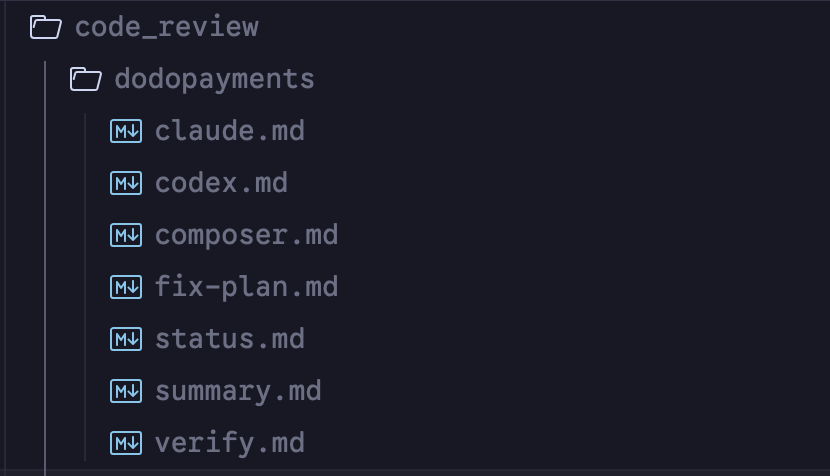
code_review
├── checkout-refactor/
│   ├── codex.md
│   ├── composer.md
│   ├── summary.md
│   ├── fix-plan.md
│   ├── status.md      # updated status
│   ├── verify.md      # verification results and details
Why You Can’t Use the Same Model to Fix and Review
Once you’ve decided what to fix, there’s one hard rule: the model that fixes must not be the model that verifies.
The reasoning is the same as with human code review — you can’t have the same person write the code and review it. They won’t catch their own bugs, not because they lack ability, but because of cognitive inertia. AI is the same way.
Plus, using a different model for verification has an extra benefit: if the second model also signs off on the fixes, I can feel reasonably confident. It’s like having two lines of defense.
Closing Thoughts
After using this workflow for a while, here are my honest impressions:
The biggest value is peace of mind. Before, I was hesitant to merge AI-written code because I couldn’t tell if there were hidden traps. Now, after running through this process, I know which issues were evaluated and which ones I consciously chose not to fix. I merge code with my eyes open.
Multi-model review works, but don’t overuse it. Save it for big features. For small changes, it’s not worth it — one model is enough.
Review Forge solves a simple problem: use multiple AIs to surface as many issues as possible, then let a human decide which ones are worth fixing.
If you’re writing most of your code with AI and your review process is struggling to keep up, give a similar workflow a try. You don’t need my exact setup — the core is just three things:
- Use multiple AIs to review your code and reduce blind spots
- Manually go through every finding and decide what to fix
- Fix, run tests, and cross-verify with a different model
Here’s what the final file structure looks like: